We have just released cvss-rs 0.5.0, a new version of our Rust library for parsing and scoring CVSS vectors—compact strings that describe a vulnerability’s exploitability and impact. We primarily develop cvss-rs for use in Trustify, an open-source platform for software supply chain security.
Alongside fixes and API improvements, this release includes its most visible new feature: an online CVSS verifier. Paste a CVSS vector into it and the verifier detects the version, parses its metrics, calculates the score, and gives you a URL you can share. It supports CVSS 2.0, 3.0, 3.1, and 4.0. Kudos to Jens Reimann for developing it!
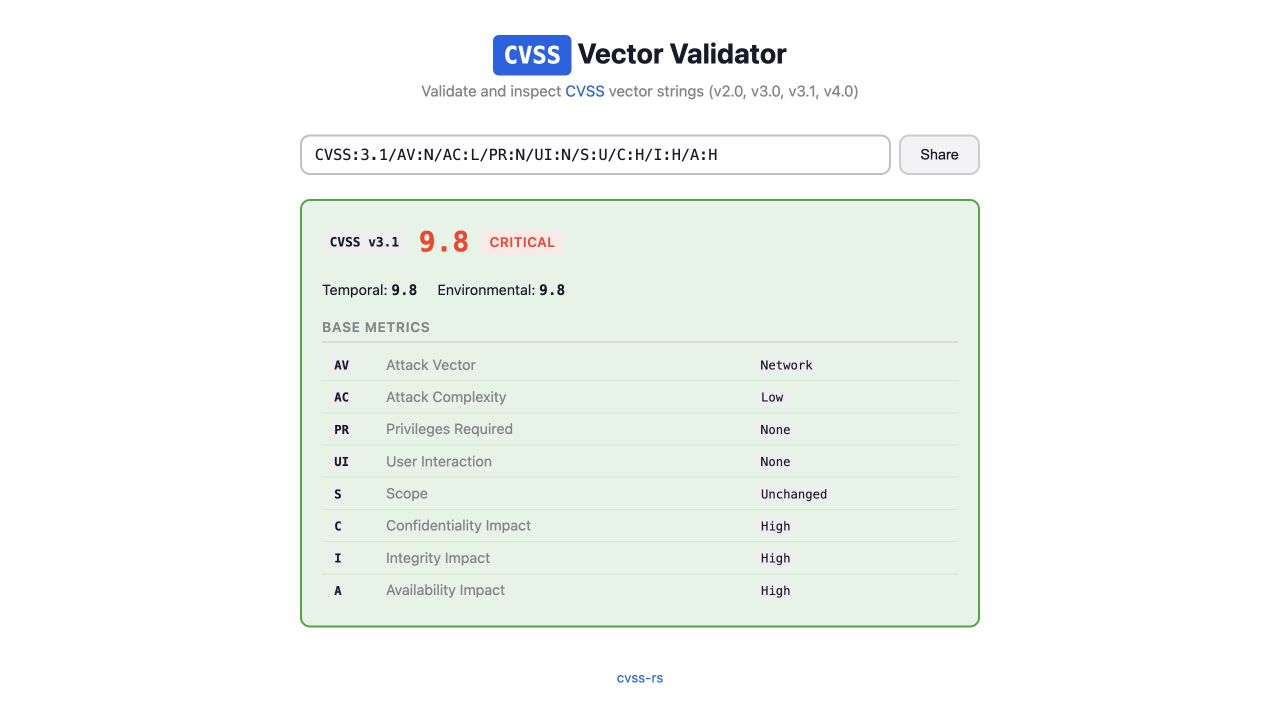
A verifier is a useful tool, but to me the interesting part is its architecture. It is not a typical JavaScript application calling a Rust library through a custom API. The UI and the library are built together as one Rust workspace and run entirely in the browser. The result is a super slick in-browser tool that loads and responds instantly.
How it all fits together #
The verifier is a Leptos application using client-side rendering. A Leptos application is made of Rust functions called components. Each component describes a piece of the user interface with the view! macro and attaches Rust closures to browser events such as typing or clicking.
Client-side rendering means those components run in the browser rather than on a server. During the build, Trunk—a build tool and development server for Rust web applications—compiles the application and its direct dependency on cvss-rs into the same WebAssembly module. A small piece of JavaScript generated by wasm-bindgen loads that module. Leptos then mounts the top-level component into the page and manages the DOM from Rust.
Leptos stores the vector text in a signal: a value that notifies the UI when it changes. Editing the input updates that signal, so the result view calls the appropriate cvss-rs parser and refreshes the score and metrics—or shows a parsing error. Leptos handles the updates; the library handles the CVSS rules.
flowchart LR
    P["Web page
Input, score and metrics"] <-->|"Events and updates"| L
    subgraph W["WebAssembly module in the browser"]
        L["Leptos
UI and reactive state"] <-->|"Rust function calls"| C["cvss-rs
Parsing and scoring"]
    end
The browser downloads the generated JavaScript and WebAssembly as static files, then instantiates the module locally. In the current release build, the WebAssembly file is around 562 KB, or about 116 KB compressed with gzip. Once it is loaded, parsing and scoring need no request to a server, so feedback is immediate and the vector never leaves the browser. As a bonus, the verifier acts as a real consumer of the library on another compilation target, making it harder for parsing, scoring, and presentation to drift apart.
A thin browser-specific layer #
Only sharing requires direct access to browser APIs, through the web-sys Rust bindings. As you type, the verifier stores the vector in the URL with history.replaceState, which changes the address without reloading the page or adding every keystroke to the browser history. Opening that URL restores the same vector and result. The Share button copies it using the asynchronous Clipboard API; wasm-bindgen-futures bridges its JavaScript Promise to Rust and changes the button to “Copied!” only after the write succeeds.
Building and shipping it #
Trunk builds the Leptos application and packages the WebAssembly module with its generated bindings and static assets. GitHub Actions then deploys the resulting dist directory to GitHub Pages. Static hosting is all the verifier needs.
Other 0.5.0 improvements #
Version 0.5.0 also improves the foundation on which the verifier sits. It completes formatting and parse/format round trips across CVSS versions, corrects CVSS v3 rounding, fixes CVSS v4 nomenclature, and preserves the optional prefix of v2 vectors. The release also exposes a few useful building blocks, including severity conversion and NotDefined handling.
You can now use the verifier to see and test these changes: enter a vector, inspect how it was understood, and compare the calculated result without installing anything. And file an issue if you spot a problem.
Try the online verifier, read the 0.5.0 release notes, or add the library with cargo add cvss-rs.